




 BFSI
BFSI HealthCare
 Edtech
 SaaS
SaaS Automobile
 Travel
An XML sitemap is a file that lists a website’s URLs along with metadata like last-modified dates, giving search engines a structured map of a site’s content. It helps Google and Bing discover and crawl pages more efficiently, particularly on large or newly launched sites.
Google explicitly recommends a sitemap for sites with more than 500 pages, new sites with few external links, or sites with heavy video and image content (Source). Every sitemap file is capped at 50,000 URLs or 50MB uncompressed, whichever limit is hit first.
This guide covers what a sitemap xml file actually is, how it’s structured, the real benefits it provides, and the exact steps to create and submit one.

What Is an XML Sitemap?
An XML sitemap is a file that lists a website’s URLs, giving search engines structured information about a site’s pages and how they relate to each other. The file uses Extensible Markup Language (XML), a format built for machine readability, so crawlers like Googlebot can parse it directly.
Detailed Definition
An XML sitemap works as a roadmap of a website, guiding search engines through its pages and content hierarchy. Each URL entry can carry metadata:
● The date the page was last modified.
● How frequently the page changes.
● The page’s priority relative to other URLs on the site.
Worth noting directly: Google ignores the priority and changefreq values entirely when crawling (Source). Google does use the lastmod value, but only when it can verify the date is accurate against the page’s actual last significant update.
Structure and Components
An XML sitemap follows a specific format set by the sitemaps protocol. The core components:
● XML Header: declares the XML version and encoding.
● URL Set: the container element for all URL entries.
● URL Entry: holds the details for one specific URL.
● Location tag (loc): the URL of the page itself.
● Last modified tag (lastmod): the page’s most recent significant update date.
● Change frequency tag (changefreq): an estimate of update frequency, ignored by Google but supported by some other engines.
● Priority tag (priority): a 0.0 to 1.0 importance value, also ignored by Google.
A minimal, valid entry looks like this, per the sitemaps.org protocol (Source):
<?xml version=”1.0″ encoding=”UTF-8″?>
<urlset xmlns=”http://www.sitemaps.org/schemas/sitemap/0.9″>
<url>
<loc>http://www.example.com/</loc>
<lastmod>YYYY-MM-DD</lastmod>
</url>
</urlset>
XML Sitemaps vs. HTML Sitemaps
An XML sitemap is built for search engines. An HTML sitemap is built for human visitors, showing a browsable, hierarchical list of a site’s pages so people can find content manually. Most sites benefit from having both, serving different audiences.
Why It Matters for SEO
A sitemap xml file gives search engines a reliable way to discover every important page a site wants indexed, which matters most for:
● Large websites: helps ensure indexing reaches every page, not just the ones with strong internal links.
● New websites: assists crawling when few or no external sites link in yet.
● Sites with heavy media: helps proper indexing of images and video.
● Complex site structures: clarifies hierarchy and relationships between pages that internal linking alone might not surface.
Benefits of Using an XML Sitemap

1. Improved Crawlability
A sitemap gives crawlers a direct, organized list of a site’s pages rather than relying solely on discovery through links. This matters most for large or structurally complex sites.
2. Better Indexing
By surfacing every important URL directly, a sitemap increases the odds that pages actually get indexed, particularly pages with limited internal links pointing to them.
3. Faster Discovery of New Content
An accurate lastmod tag signals to search engines when a page has meaningfully changed, which can prompt faster re-crawling of updated or newly published content.
4. Easier Troubleshooting
Reviewing sitemap status in Google Search Console or Bing Webmaster Tools surfaces indexing errors, excluded URLs, and crawl issues that would otherwise be hard to detect.
5. Support for Rich Media Content
Dedicated image and video sitemap extensions help search engines index media assets correctly, which plain HTML crawling alone often misses.
How to Create an XML Sitemap
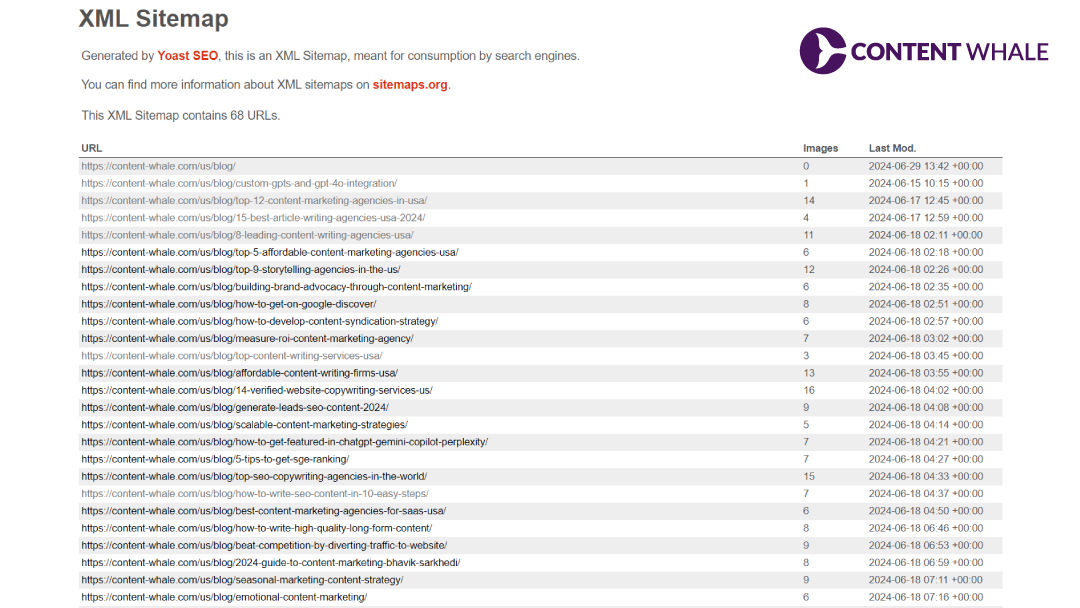
Using WordPress Plugins
● Yoast SEO: install and activate the plugin, then go to SEO > General > Features and confirm the XML Sitemaps toggle is on. The sitemap is typically available at /sitemap_index.xml.
● All in One SEO (AIOSEO): install the plugin, go to All in One SEO > Sitemaps, and enable the sitemap feature. AIOSEO also supports manually adding external URLs.
Using Standalone Tools
● XML-Sitemaps.com: enter a site URL, let the tool crawl the site, then download and upload the generated file to the site’s root directory.
● Screaming Frog SEO Spider: crawl the site, then use the built-in Sitemaps > XML Sitemap feature to configure and export the file.
Best Practices While Building One
● Include only URLs meant to be indexed. Leave out noindex pages and duplicate content.
● Keep lastmod accurate and tied to genuinely significant content changes, not cosmetic edits.
● Stay under the 50,000 URL / 50MB limit per file. Use a sitemap index file to split larger sites.
● Update the sitemap whenever pages are added or removed, and resubmit when the change is significant.
Submitting an XML Sitemap to Search Engines
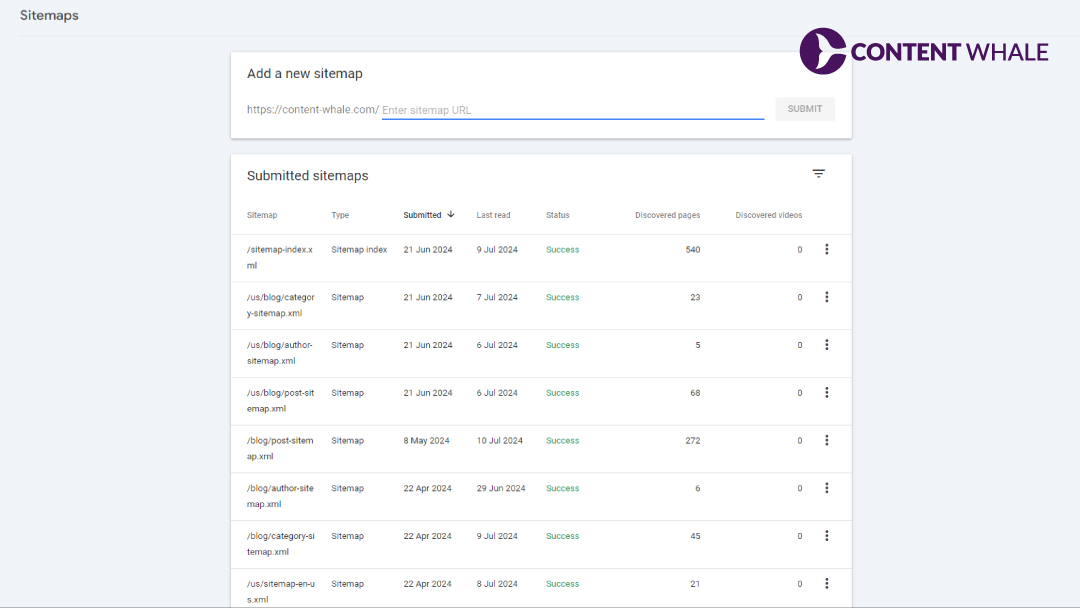
Google Search Console
● Verify site ownership in Google Search Console.
● Open the Sitemaps section under Index in the left-hand menu.
● Enter the sitemap URL (for example, https://example.com/sitemap.xml) and submit.
Bing Webmaster Tools
● Add and verify the site in Bing Webmaster Tools.
● Open Sitemaps under Configure My Site.
● Submit the sitemap URL. Bing indexing also feeds Yahoo search results.
Robots.txt Reference
Adding a sitemap reference to robots.txt helps search engines discover it even without direct submission:
Sitemap: https://example.com/sitemap.xml
Frequently Asked Questions
What is an XML sitemap and why do I need one?
An XML sitemap is a file listing a site’s URLs, giving search engines a structured view of the site’s content and structure. It helps ensure important pages get discovered and indexed, especially on large sites, new sites with few backlinks, or sites with heavy media content.
How do I create an XML sitemap for my website?
WordPress users can generate one automatically through plugins like Yoast SEO or AIOSEO. Non-WordPress sites can use tools like XML-Sitemaps.com or Screaming Frog SEO Spider to crawl the site and export a sitemap file, which then gets uploaded to the site’s root directory.
What are the benefits of using an XML sitemap for SEO?
An XML sitemap improves crawlability, supports better indexing, speeds up discovery of new or updated content, helps surface site errors through Search Console, and supports proper indexing of image and video content.
How do I submit an XML sitemap to search engines?
In Google Search Console, open the Sitemaps section, enter the sitemap URL, and submit. The process is similar in Bing Webmaster Tools. Adding the sitemap URL to robots.txt is an additional way for crawlers to discover it automatically.
Do I need an XML sitemap if my site is small?
Google states that sites with roughly 500 pages or fewer, and full internal link coverage from the homepage, generally don’t require one. A sitemap is still useful even at that size, since it guarantees every page is visible to crawlers regardless of internal linking gaps.
Conclusion
An XML sitemap is a structured file that lists a site’s URLs and helps search engines crawl and index them efficiently. It matters most for large sites, new sites with few backlinks, and sites carrying heavy image or video content.
Creating one is straightforward with plugins or standalone generators, and submitting it through Google Search Console and Bing Webmaster Tools takes only a few minutes.
Need help auditing your site’s technical SEO setup, sitemaps included? Talk to the Content Whale team about a full technical review.





 Content Whale – USA


