



 BFSI
BFSI HealthCare
 Edtech
 SaaS
SaaS Automobile
 Travel
Every piece of content you publish is a bet. You’re betting your time, your budget, and your team’s energy on the assumption that someone out there is searching for what you’ve written. Keyword research is how you stop guessing and start knowing.
Yet most marketers skip it, or do it badly. They pick keywords based on gut instinct, chase high-volume terms they’ll never rank for, or treat a five-minute Google Autocomplete session as “research.” The result? Blog posts that flatline at zero traffic. Pages that rank on page seven. Content calendars built on wishful thinking.
Here’s the reality: 90% of web pages get zero organic traffic from Google. Not low traffic, zero. The difference between those pages and the ones pulling in thousands of monthly visitors almost always comes down to one thing: keyword research done right.
This guide will teach you exactly how to do keyword research using a repeatable 6-step framework we call the S.E.A.R.C.H. Method. Whether you’re a freelance writer picking topics for a client, a small business owner trying to get found on Google, or a marketing team building a content strategy from scratch this is the process that works in 2026, including for AI-powered search engines like ChatGPT and Google AI Overviews.
By the end of this guide, you will:
- Understand what keyword research is and why it’s non-negotiable for SEO
- Know how to find hundreds of keyword ideas in minutes for free
- Be able to evaluate keywords using real metrics instead of guesswork
- Have a clear framework for turning keyword data into a content plan
- Know how to adapt your keyword strategy for the age of AI search
Let’s get into it.
What is keyword research (and why it still matters in 2026)
Keyword research is the process of finding and analyzing the search terms people type into search engines when looking for information, products, or solutions. It tells you what your audience is actively searching for, how often they search for it, and how hard it will be to rank for those terms.
Think of it as market research for your content. Before you write a single word, keyword research answers three critical questions: What should I write about? Who will read it? Can I actually compete?
Some marketers have started asking whether keyword research even matters anymore, given the rise of AI Overviews and zero-click searches. Fair question. In 2026, AI Overviews appear on roughly 30–48% of Google searches, and about 60% of all searches end without a click. Those numbers sound scary until you dig deeper.
The pages that AI Overviews cite? They’re the same pages that rank well organically. A study from seoClarity found that 97% of AI Overview citations come from pages ranking in the top 20 organic results. Translation: if you rank, you get cited. And the visitors who do click through from AI-generated answers convert at dramatically higher rates than traditional search traffic.
Keyword research isn’t dying. It’s evolving. The fundamentals — finding what people search for, matching their intent, creating content that earns visibility — are more important than ever. What’s changed is that you now need to research keywords for both traditional rankings and AI citation potential. The S.E.A.R.C.H. Framework covers both.
The S.E.A.R.C.H. Framework: 6 steps to find keywords that actually rank
Most keyword research guides give you a vague process: “brainstorm some ideas, plug them into a tool, pick the best ones.” That’s not a system, it’s a suggestion.
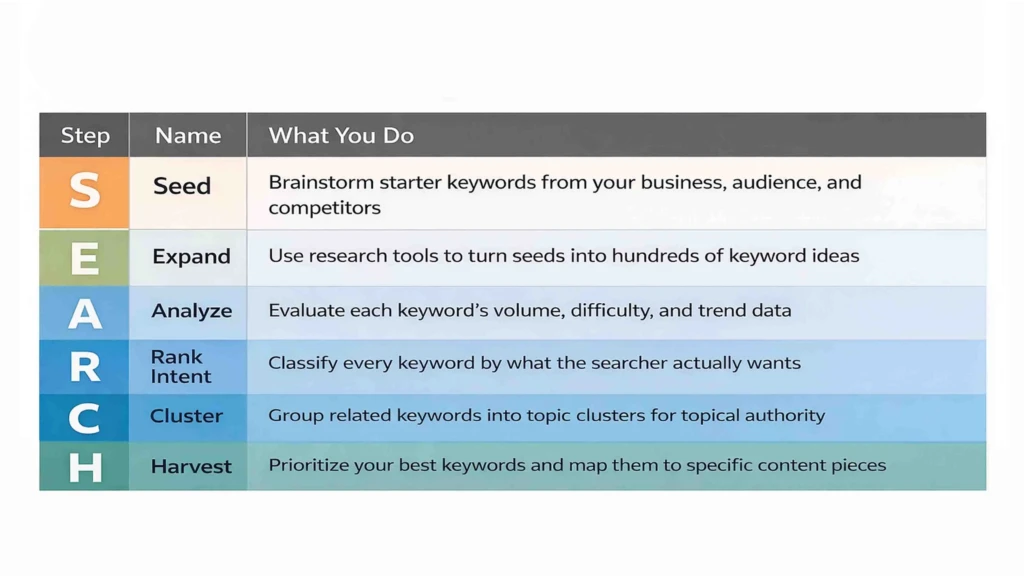
The S.E.A.R.C.H. Framework gives you a structured, repeatable method you can follow every time you plan content. Here’s the overview:
| Step | Name | What You Do |
|---|---|---|
| S | Seed | Brainstorm starter keywords from your business, audience, and competitors |
| E | Expand | Use research tools to turn seeds into hundreds of keyword ideas |
| A | Analyze | Evaluate each keyword’s volume, difficulty, and trend data |
| R | Rank Intent | Classify every keyword by what the searcher actually wants |
| C | Cluster | Group related keywords into topic clusters for topical authority |
| H | Harvest | Prioritize your best keywords and map them to specific content pieces |
Each step builds on the previous one. Skip a step and you’ll end up with a keyword list that looks impressive but doesn’t drive results. Let’s walk through each one.
Step 1 — Seed: brainstorm your starting keywords
Every keyword research project starts with seed keywords, the broad, obvious terms that describe your business, your products, or the topics you want to rank for. These aren’t the keywords you’ll target directly. They’re starting points that you’ll expand into a much larger list in Step 2.
How to find seed keywords:
- Write down your core topics. If you run a digital marketing agency, your seed keywords might include: SEO, content marketing, social media marketing, PPC advertising, email marketing. List 5–10 broad topics.
- Listen to your customers. What words do real customers use when they describe their problems? Check support tickets, sales calls, reviews, and social media comments. The language your audience uses is often different from your internal jargon.
- Mine Reddit and forums. Go to relevant subreddits (like r/SEO, r/smallbusiness, or r/marketing) and note the exact phrases people use in their questions. A post asking “how do I get my bakery to show up on Google Maps” tells you that “local SEO for bakeries” or “Google Business Profile optimization” are real search intents.
- Spy on competitors. Visit 3–5 competing websites and scan their blog categories, service pages, and navigation menus. What topics do they cover? Write down every relevant term you see.
- Use Google Autocomplete. Type each broad topic into Google’s search bar and note what Google suggests. These suggestions are based on actual search behavior, they show you what real people search for.
At this stage, don’t overthink it. You’re aiming for a list of 15–30 seed keywords. Quality doesn’t matter yet, volume of ideas does. You’ll refine ruthlessly in later steps.
Quick example: Let’s say you’re a freelance copywriter who wants to attract clients through organic search. Your seed keywords might include: copywriting, freelance writing, content writing, landing page copy, email copywriting, brand messaging, website copy, SEO writing.
Step 2 — Expand: grow your list with research tools
This is where keyword research gets exciting. You’ll take your seed keywords and run them through research tools that reveal hundreds, sometimes thousands of related terms, questions, and phrases your audience is actually searching for.
The best tool for this step (especially if you’re on a budget or just getting started) is Answer Socrates. Here’s why: you enter a single seed keyword, and it returns 500–1,300+ keyword variations pulled from Google Autocomplete, People Also Ask data, and Google Trends. It organizes results into questions (who, what, where, why, how), prepositions (for, with, near), comparisons (vs, or, like), and alphabetical expansions, giving you a complete picture of how people search around your topic.
The free plan gives you 3 searches per day with no credit card required. That’s potentially 3,000–5,000 keyword ideas per month at zero cost. For comparison, AnswerThePublic (a similar tool) caps out at around 100–540 results per search and charges $99/month for its paid plan.
How to expand your keyword list:
- Enter each seed keyword into Answer Socrates one at a time.
- Download the CSV export for each search, it includes search volume estimates, CPC data, and competition metrics.
- Pay special attention to the Questions section. These are gold for blog posts, FAQ pages, and content that ranks in People Also Ask boxes and AI Overviews.
- Use the Recursive Search feature to dig deeper. It takes the most popular questions from your initial results and generates follow-up questions, surfacing long-tail keywords that other tools miss entirely.
- Combine results into a single master spreadsheet.
Don’t stop at one tool. Supplement your Answer Socrates research with:
- Google Keyword Planner (free with a Google Ads account) gives you official Google search volume ranges and competition data.
- Google Search Console — shows keywords your site already ranks for. These are low-hanging fruit for quick wins.
- Google Trends — helps you spot rising and declining topics so you’re not writing about yesterday’s trend.
After this step, you should have a master list of 200–1,000+ keyword ideas. That sounds like a lot and it is. The next four steps will help you filter, score, and organize this list into something actionable.
Step 3 — Analyze: evaluate the metrics that matter
Not all keywords are worth targeting. A keyword with 50,000 monthly searches sounds appealing until you realize the top 10 results are all from sites like Wikipedia, Amazon, and Forbes. This step teaches you to read the numbers that actually predict whether you can rank.
The four keyword metrics you need to understand:
Search volume tells you how many times a keyword is searched per month. Higher isn’t always better. A keyword with 200 monthly searches and strong buying intent can be more valuable than a keyword with 10,000 searches and vague informational intent. As a general rule for beginners: keywords in the 100–2,000 monthly search range offer the best balance of traffic potential and rankability.
Keyword difficulty (KD) estimates how hard it will be to rank on page one. Most tools score this from 0–100. For newer sites or those without strong domain authority, target keywords with a KD under 30. Once your site builds authority, you can go after higher-difficulty terms.
CPC (cost per click) shows what advertisers pay for clicks on this keyword in Google Ads. A high CPC (say, $5–$15+) signals that the keyword has commercial value, people who search for it are close to making a purchase decision. Even if you’re doing organic SEO and not running ads, CPC is a useful proxy for business value.
Trend direction tells you whether search interest is growing, stable, or declining. Answer Socrates shows Google Trends data alongside every search, and you can download this in the CSV export. Prioritize keywords with stable or rising trends. Avoid investing in terms with clear downward trajectories.
Practical filtering approach: Open your master spreadsheet and add columns for each metric. Then filter out keywords that fail any of these tests:
- Search volume under 10/month (unless ultra-specific long-tail)
- Keyword difficulty over 50 (for newer sites, set this at 30)
- Declining trend with no signs of recovery
This step typically cuts your list by 30–50%, leaving you with a focused set of realistic targets.
Step 4 — Rank Intent: classify every keyword by search intent
Search intent is the reason behind a search query, what the person actually wants when they type something into Google. Getting intent wrong is the single most common reason content fails to rank, even when it targets the right keyword.
The four types of search intent:
- Informational — The searcher wants to learn something. Examples: “what is keyword research,” “how to bake sourdough bread.” Best content format: guides, tutorials, explainer articles.
- Commercial investigation — The searcher is researching before a purchase. Examples: “best keyword research tools,” “Semrush vs Ahrefs.” Best format: comparison posts, reviews, listicles.
- Transactional — The searcher is ready to buy or take action. Examples: “buy Ahrefs subscription,” “Answer Socrates pricing.” Best format: product pages, pricing pages, landing pages.
- Navigational — The searcher is looking for a specific website. Examples: “Google Keyword Planner,” “Content Whale blog.” Best format: your homepage or brand pages.
How to determine intent for any keyword: Open Google in an incognito window, search for the keyword, and study the top 5 results. What type of content dominates? If the top results are all how-to guides, the intent is informational and you need to write a how-to guide, not a product page. If the results are all comparison tables and reviews, the intent is commercial. Match the format and depth of what already ranks.
Add an “Intent” column to your spreadsheet and tag every keyword as Informational (I), Commercial (C), Transactional (T), or Navigational (N). This step is critical because it determines what type of content you create for each keyword and it prevents the common mistake of writing a blog post for a keyword where Google clearly wants a product page.
Answer Socrates makes this easier by automatically labeling keywords as TOFU (Top of Funnel / Informational), MOFU (Mid-Funnel / Commercial), or BOFU (Bottom of Funnel / Transactional) — saving you time on manual classification.
Step 5 — Cluster: group keywords into topic clusters
Here’s a mistake most beginners make: they create a separate piece of content for every single keyword on their list. This leads to thin content, keyword cannibalization (where multiple pages compete with each other for the same keyword), and a fragmented site structure that confuses both readers and search engines.
The smarter approach is keyword clustering, grouping semantically related keywords together so you can target multiple keywords with a single, comprehensive piece of content.
For example, these keywords should all be covered in one article, not four separate ones:
- “how to do keyword research”
- “keyword research process”
- “keyword research step by step”
- “keyword research for beginners”
They all share the same search intent. Google knows this and ranks the same pages for all of them.
How to cluster keywords:
Manual method: Sort your spreadsheet by topic similarity. Look for keywords that a single piece of content could reasonably cover. Group them together and assign a “Primary Keyword” (the highest-volume, most relevant term) and “Secondary Keywords” (supporting terms to weave into the content naturally).
AI-powered method: Answer Socrates has a built-in keyword clustering tool that does this automatically. Upload your CSV of keywords, and the AI groups them into logical topic clusters in about 5–6 seconds. Each cluster shows combined search volume and a competition index, making it easy to spot your highest-opportunity topics at a glance. The free plan includes 1,500 clustering credits per month, enough to cluster a large keyword list without spending anything.
Once your keywords are clustered, you’ll see your content strategy take shape. Each cluster becomes a potential blog post, landing page, or content pillar. Related clusters can be linked together to build topical authority, the signal that tells Google your site is a trusted resource on a subject.
Step 6 — Harvest: prioritize and map keywords to content
You’ve done the hard analytical work. Now it’s time to decide what to write first. Not every keyword cluster deserves equal attention. You need a scoring system that ranks clusters by their potential ROI.
Score each keyword cluster on three factors (rate each 1–5):
- Business relevance: How closely does this topic relate to your product, service, or monetization goal? A keyword cluster about “free email marketing tools” scores a 5 for an email marketing platform and a 1 for a plumbing company.
- Ranking potential: Based on keyword difficulty, your site’s current authority, and the competitive landscape — can you realistically reach page one within 3–6 months?
- Traffic value: Consider search volume, CPC (a proxy for commercial value), and trend direction. Growing topics with decent volume and high CPC score highest.
Multiply the three scores together. A cluster scoring 5 × 4 × 4 = 80 gets written before a cluster scoring 3 × 2 × 3 = 18.
Map winning clusters to content types. Based on the search intent you identified in Step 4:
- Informational clusters → How-to guides, tutorials, explainer articles
- Commercial clusters → Comparison posts, “best of” lists, reviews
- Transactional clusters → Product pages, landing pages, case studies
Finally, drop your prioritized keyword clusters into a content calendar. Assign target publish dates, writers, and deadlines. The S.E.A.R.C.H. Framework doesn’t end when you have a keyword list, it ends when you have a content plan you can execute.
The best keyword research tools in 2026 (compared)
You don’t need to spend hundreds per month on SEO software to do effective keyword research. Here’s an honest comparison of the most useful tools, including free options that punch well above their price tag.
| Tool | Best For | Free Plan | Paid From | Keywords Per Search | Clustering | Standout Feature |
|---|---|---|---|---|---|---|
| Answer Socrates | Beginners, freelancers, budget-conscious teams | 3 searches/day, 1,500 clustering credits | $9/mo | 500–1,300+ | Yes (AI-powered) | Intent labeling, recursive search, 190+ countries |
| Google Keyword Planner | Search volume data | Unlimited (with Ads account) | Free | Varies | No | Official Google volume ranges |
| Semrush | Enterprise keyword intelligence | 10 searches/day | $139.95/mo | 25B+ keyword database | Yes | AI visibility tracking, keyword gap analysis |
| Ahrefs | Competitive analysis | Limited free tools | $99/mo | 28B+ keyword database | Yes | Traffic potential metric, parent topic grouping |
| Ubersuggest | Simple SEO beginners | 3 searches/day | $29/mo | 100–300 | No | Chrome extension for quick checks |
| AnswerThePublic | Visual question research | 3 searches/day | $99/mo | 100–540 | No | Iconic visual wheel diagrams |
| Google Trends | Seasonal and trending topics | Unlimited | Free | N/A | No | Real-time trending data by region |
Our pick: For most readers of this guide: marketers, freelancers, content creators, and small business owners Answer Socrates offers the strongest free plan in the market. You get more keywords per search than any comparable tool, AI-powered clustering, search volume and CPC data in your exports, and intent labels, all without entering a credit card. If you need heavy-duty competitive analysis (backlink profiles, site audits, rank tracking), pair it with Ahrefs or Semrush. But for the keyword research phase specifically, Answer Socrates covers everything you need.
Try it free: Run your first keyword search on Answer Socrates, no signup required. Enter any seed keyword and get 500–1,300+ keyword ideas with search volume, intent labels, and trend data in under 10 seconds. It’s the fastest way to start the S.E.A.R.C.H. Framework.
How to use Answer Socrates for keyword research (step-by-step walkthrough)
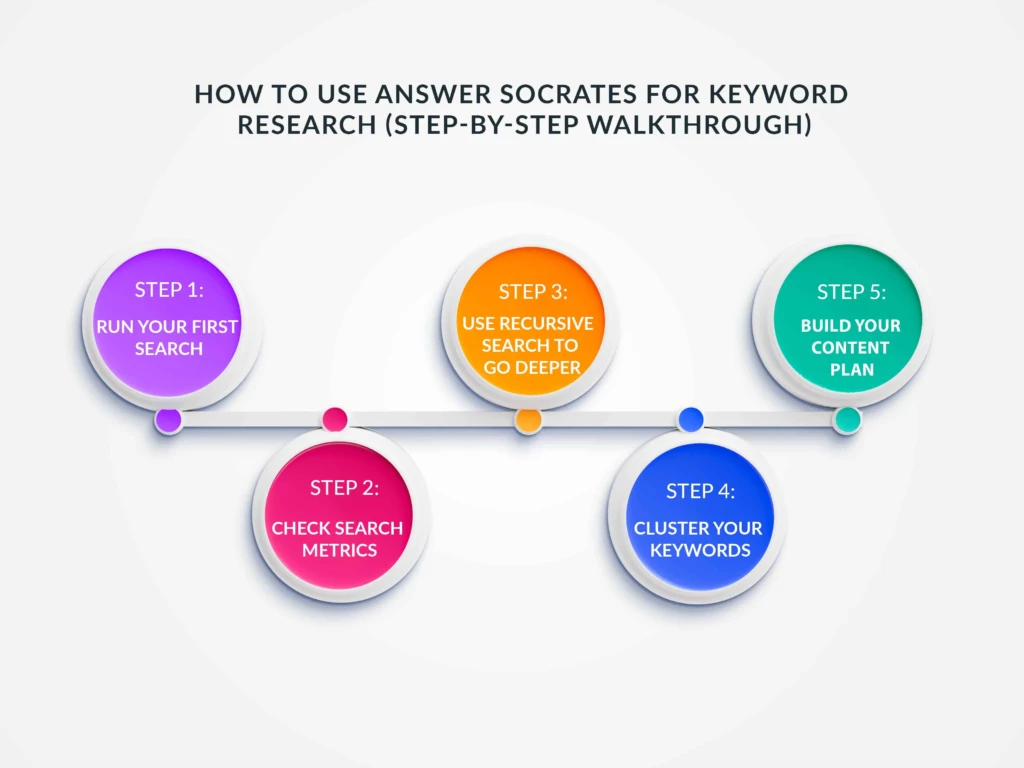
Let’s put the S.E.A.R.C.H. Framework into practice with a real example. Suppose you’re a freelance content writer who wants to attract clients through organic search. Your seed keyword is “content writing.”
Step 1: Run your first search
Go to answersocrates.com. You’ll see a clean search bar, no account walls or popups. Type “content writing” into the search bar, select your target country (e.g., United States), and hit search.
Within seconds, you’ll see 800–1,200+ keyword suggestions organized into tabs:
- Questions tab: “what is content writing,” “how to start content writing,” “is content writing a good career,” “how much do content writers charge” — these are goldmine topics for blog posts.
- Prepositions tab: “content writing for beginners,” “content writing with AI,” “content writing for social media” — these reveal specific subtopics and niches.
- Comparisons tab: “content writing vs copywriting,” “content writing or blogging” — perfect for comparison posts that rank for commercial keywords.
- Alphabetical tab: Expands your seed across A–Z variations, surfacing terms you’d never brainstorm on your own.
Step 2: Check search metrics
Each keyword shows a TOFU/MOFU/BOFU intent label. Keywords tagged BOFU (like “hire content writer” or “content writing services pricing”) have the highest conversion potential. On the free plan, download the CSV to see search volume and CPC for every keyword. On paid plans, these metrics appear directly in the interface.
Step 3: Use recursive search to go deeper
Click the Recursive Search button on any high-potential question. If your initial search surfaces “how to start content writing as a career,” the recursive search will generate follow-up questions like “how much can a beginner content writer earn,” “content writing portfolio examples,” and “best content writing courses online.” This is how you find the ultra-specific long-tail keywords that are easiest to rank for and closest to a purchase decision.
Step 4: Cluster your keywords
Export your full keyword list as a CSV. Then navigate to the Keyword Clustering tool. Upload your CSV, and in about 5 seconds, the AI will group your keywords into logical topic clusters, each with a combined search volume and competition score. You’ll instantly see which clusters represent your biggest opportunities.
Step 5: Build your content plan
Each cluster becomes a content piece. Sort clusters by search volume and low competition to identify quick wins. Map each cluster to a content type based on intent. Your editorial calendar essentially writes itself.
From a single seed keyword, you’ve gone from zero to a structured content strategy in under 15 minutes.
Keyword research for AI search: AEO, GEO, and AI Overviews
If your keyword research process hasn’t changed since 2023, you’re already behind. The search landscape in 2026 has a new layer: AI-powered answers. Google AI Overviews now appear on roughly 30–48% of US searches, and platforms like ChatGPT (processing 2.5 billion prompts daily), Perplexity, and Gemini are becoming primary research tools for millions.
This doesn’t make keyword research obsolete — it makes it more important. But you need to add a new dimension to your process.
AEO (Answer Engine Optimization) is the practice of structuring your content so AI systems can discover, understand, and cite it as an authoritative answer. GEO (Generative Engine Optimization), a framework developed by researchers at Princeton and Georgia Tech, focuses specifically on earning citations within AI-generated responses.
Three things to add to your keyword research process for AI search:
First, flag keywords that trigger AI Overviews. When you search for a keyword, note whether an AI Overview appears. If it does, your content needs to be structured for citation, not just ranking. This means opening every section with a direct, clear answer in the first 1–2 sentences (exactly what you’re reading now), using factual statements with specific numbers, and applying schema markup. Semrush and Ahrefs now indicate which keywords trigger AI Overviews in their databases.
Second, research what AI systems say about your topic. Before writing, ask ChatGPT and Perplexity the same question your keyword targets. What sources do they cite? What information do they include? What’s missing? This tells you what you need to match (to be considered a credible source) and where you can add original value (to stand out from what AI already says).
Third, prioritize keywords where clicks still happen. AI Overviews absorb the click for simple factual queries (“what is keyword research”). But complex, nuanced queries (“how to do keyword research for a SaaS startup”) still drive substantial click-through. Long-tail, specific keywords are your best bet for earning traffic in the AI era. Transactional and commercial keywords are also relatively protected only about 12% of transactional queries trigger AI Overviews.
The rule of thumb: create content that AI wants to cite, not content that AI can replace.
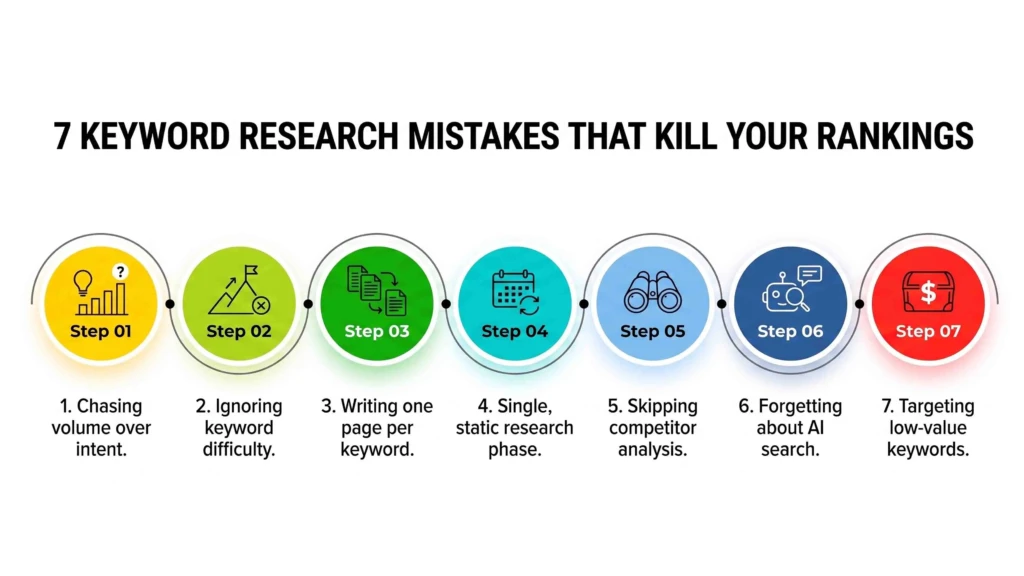
7 Keyword Research Mistakes that Kill your Rankings
After working with hundreds of content campaigns, these are the errors we see most often, and they’re all avoidable.
1. Chasing volume over intent. A keyword with 50,000 monthly searches means nothing if the search intent doesn’t match your content. A 500-volume keyword with strong buying intent will drive more revenue than a 50K informational keyword every time. Always check intent before committing to a keyword.
2. Ignoring keyword difficulty. New sites targeting keywords with a difficulty score of 80+ are setting themselves up for months of zero traffic. Start with low-difficulty keywords (KD under 30), build authority with consistent publishing, then gradually target harder terms.
3. Writing one page per keyword. This creates thin content and keyword cannibalization. Use clustering (Step 5 of the S.E.A.R.C.H. Framework) to group related keywords into comprehensive pieces that target multiple terms simultaneously.
4. Doing keyword research once and never again. Search behavior changes constantly. New trends emerge, competitors publish new content, and seasonal shifts alter demand. Revisit your keyword research quarterly at minimum. Use Google Search Console to spot declining keywords that need attention and rising keywords that deserve new content.
5. Skipping competitor analysis. Your competitors have already done keyword research for you look at what they rank for. Tools like Ahrefs’ Content Gap feature or a manual review of competitor blog categories will reveal topics you’re missing.
6. Forgetting about AI search. In 2026, roughly half of Google searches trigger an AI Overview. If you’re only optimizing for traditional rankings and ignoring how AI surfaces and cites your content, you’re leaving visibility on the table. Add AI citation analysis to your keyword research workflow.
7. Targeting keywords with no business value. Traffic is vanity. Revenue is sanity. Every keyword you target should connect to your business goals, whether that’s lead generation, product sales, affiliate revenue, or brand authority. Score every keyword for business relevance before adding it to your content calendar.
FAQ: keyword research questions answered
What is keyword research and why is it important?
Keyword research is the process of identifying the words and phrases people type into search engines when looking for information, products, or services. It’s important because it ensures your content matches real search demand. Without it, you’re creating content nobody is searching for which means zero organic traffic, wasted resources, and missed revenue opportunities.
How do beginners do keyword research?
Beginners should start by brainstorming 10–15 seed keywords related to their business or niche. Then use a free tool like Answer Socrates to expand those seeds into hundreds of keyword ideas. Filter by search volume and difficulty, classify each keyword by search intent, and group related keywords into clusters. The S.E.A.R.C.H. Framework in this guide walks you through this exact process.
What is the best free keyword research tool?
Answer Socrates offers the most generous free plan among keyword research tools in 2026. It provides 3 searches per day (each returning 500–1,300+ keywords), CSV exports with search volume and CPC data, 1,500 AI-powered clustering credits per month, and intent labels all without a credit card. Google Keyword Planner and Google Search Console are also excellent free supplements.
What is the difference between short-tail and long-tail keywords?
Short-tail keywords are broad search terms of 1–2 words (like “shoes” or “marketing”) with high volume but extreme competition. Long-tail keywords are specific phrases of 3+ words (like “best running shoes for flat feet” or “content marketing for dentists”) with lower volume but much higher conversion rates and easier ranking potential. About 70% of all searches are long-tail queries.
What is keyword difficulty and how does it work?
Keyword difficulty is a metric (scored 0–100) that estimates how hard it is to rank on Google’s first page for a given keyword. It’s calculated by analyzing the authority and backlink profiles of pages currently ranking in the top 10. A KD of 0–20 is easy, 21–50 is moderate, and 51–100 is hard. Newer websites should target keywords with KD under 30.
How often should I do keyword research?
Do a comprehensive keyword research audit at least once per quarter. Between audits, monitor your Google Search Console data monthly for emerging keyword opportunities and declining positions. Seasonal businesses should do additional research before peak seasons. Any time you launch a new product, enter a new market, or notice traffic drops, run fresh keyword research.
Can I use AI tools like ChatGPT for keyword research?
Yes, but with important limitations. ChatGPT and Claude are excellent for brainstorming seed keywords, understanding topic angles, and drafting content outlines. However, they cannot provide real-time search volume data, keyword difficulty scores, or competitive analysis. Always validate AI-generated keyword ideas with a dedicated research tool like Answer Socrates or Google Keyword Planner to confirm actual search demand.
What is keyword clustering and how does it help SEO?
Keyword clustering is the process of grouping semantically related keywords together so you can target multiple terms with a single piece of content. It helps SEO by preventing keyword cannibalization (where multiple pages compete for the same term), building topical authority, and creating comprehensive content that satisfies a broader range of search queries. AI-powered clustering tools can group hundreds of keywords in seconds.
Start finding better keywords today
If you’ve read this far, you have everything you need to do keyword research that actually works. The S.E.A.R.C.H. Framework gives you a clear, repeatable process — Seed, Expand, Analyze, Rank Intent, Cluster, Harvest — that works whether you’re planning your first blog post or building a 100-page content strategy.
The biggest mistake you can make right now is treating this guide as interesting reading and doing nothing with it. Keyword research isn’t theoretical it’s practical. The value comes from doing it.
Here’s your next step: pick one seed keyword related to your business, go to Answer Socrates, and run your first search. In 10 seconds, you’ll have hundreds of keyword ideas with search volume, intent labels, and trend data. Export them. Cluster them. Score them. Then write your first piece of content targeting the highest-opportunity cluster.
That single action will put you ahead of the 90% of websites that publish content without ever doing proper keyword research.
Good luck and if your team needs help turning keyword research into high-performing content at scale, Content Whale’s team is here for exactly that.





 Content Whale – USA


