
Without HSTS enforcement, search engines can flag your site as insecure, directly impacting crawl efficiency and user trust signals that influence rankings.
An HSTS check verifies whether your website properly enforces HTTPS-only connections through the Strict-Transport-Security header.
According to a 2024 analysis of HTTP security headers in popular global websites, inconsistent HSTS implementation remains a widespread technical security issue (Source).
This guide explains how to perform an HSTS check, interpret security header results, and implement proper configuration to protect your site.

What is HSTS and Why It Matters
HTTP Strict Transport Security (HSTS) enables browsers to communicate with your website exclusively over HTTPS, eliminating opportunities for attackers to downgrade connections to insecure HTTP.
Key functions of HSTS security:
- Prevents SSL stripping attacks where attackers intercept initial HTTP requests
- Eliminates mixed content vulnerabilities across your domain
- Protects users even before they type “https://” in the address bar
- Enforces security policy at the browser level, independent of user behavior
Research from USENIX demonstrates how the absence of strict transport security policies enables targeted surveillance and protocol downgrade vulnerabilities (Source).
Once a browser receives the HSTS header, it automatically converts all HTTP requests to HTTPS for the specified duration. This happens before any network request leaves the browser, closing the vulnerability window that exists during standard HTTP-to-HTTPS redirects. Every HSTS check you perform verifies this critical browser enforcement mechanism remains active across your domain infrastructure.
How to Perform an HSTS Check

Online HSTS Checker Tools
Several web-based tools analyze your security headers and provide instant HSTS verification results.
Reliable HSTS checker services:
- SecurityHeaders.com: Provides grade-based scoring and specific recommendations
- Mozilla Observatory: Offers comprehensive security analysis including HSTS verification
- SSLLabs SSL Server Test: Includes HSTS configuration in certificate analysis
- High-Tech Bridge SSL/TLS Server Security Test: Detailed header inspection
What these tools verify:
- Presence of Strict-Transport-Security header
- Max-age value and duration adequacy
- IncludeSubDomains directive status
- Preload directive implementation
- Header delivery across different pages
Running an HSTS check through multiple tools provides cross-validation of your security configuration. Each HSTS check tool examines slightly different aspects of header implementation, catching configuration issues that single-source verification might miss.
Browser Developer Tools Method
Step-by-step verification process:
- Open your website in Chrome or Edge
- Press F12 to open Developer Tools
- Navigate to the Network tab
- Reload the page (Ctrl+R or Cmd+R)
- Click on the first document request (usually your domain name)
- Scroll to Response Headers section
- Look for “strict-transport-security” header
Correct header strict transport security syntax:
Strict-Transport-Security: max-age=31536000; includeSubDomains; preload
Component breakdown:
- max-age=31536000: Enforces HTTPS for one year (31,536,000 seconds)
- includeSubDomains: Applies policy to all subdomains
- preload: Qualifies domain for browser preload lists
Firefox Developer Tools:
- Open Firefox Developer Tools (F12)
- Select Network tab
- Reload page and click first request
- Check Headers panel for strict-transport-security
This manual HSTS check method confirms the exact HSTS header configuration your server delivers to browsers. Performing this HSTS check across different browsers ensures consistent header delivery regardless of user agent.
Chrome Net Internals HSTS Query
Accessing Chrome’s HSTS database:
- Type chrome://net-internals/#hsts in Chrome address bar
- Scroll to “Query HSTS/PKP domain” section
- Enter your domain name
- Click “Query” button
Interpreting results:
If HSTS is active, you’ll see:
- “Found:” followed by your domain
- STS subdomains: whether includeSubDomains is enabled
- STS observed: timestamp of header receipt
- STS expiry: when enforcement expires
- Mode: “STRICT” indicates active enforcement
If HSTS is not configured:
- “Not found” message appears
- Domain has no dynamic security state
- Browser treats all requests as potentially insecure
This chrome net internals HSTS method confirms whether Chrome has cached your HSTS policy and actively enforces it for users who previously visited your site. Using chrome net internals HSTS queries helps diagnose why returning visitors might experience different security behavior than new visitors during your HSTS check process.
Understanding HSTS Header Components

Max-Age Directive
The max-age directive specifies how long (in seconds) browsers should enforce HTTPS-only connections to your domain.
Recommended values:
- Minimum acceptable: 10886400 (126 days)
- Industry standard: 31536000 (1 year)
- Maximum practical: 63072000 (2 years)
Setting max-age below six months creates recurring vulnerability windows. Users who haven’t visited your site within the max-age period lose HSTS protection, exposing them to downgrade attacks during their next visit. Academic analysis of security header adoption shows that domains with short max-age values experience higher rates of configuration abandonment (Source).
Every HSTS check should verify your max-age value meets or exceeds the industry standard of 31536000 seconds. Sites failing this HSTS check requirement force users to rely on initial HTTP requests that attackers can intercept.
IncludeSubDomains Directive
This directive extends HSTS enforcement to all current and future subdomains under your primary domain.
Security benefits:
- Prevents attackers from exploiting unprotected subdomains
- Eliminates mixed content issues from subdomain resources
- Protects abandoned or forgotten subdomains
- Creates consistent security posture across entire domain structure
Before enabling includeSubDomains, verify all subdomains support HTTPS. A single subdomain without HTTPS capability will become inaccessible to users with cached strict transport security HSTS policies. Test thoroughly on staging environments before production deployment.
An HSTS check revealing includeSubDomains in your header configuration indicates comprehensive domain-wide protection. Without this directive, your HSTS check only confirms protection for the exact domain tested, leaving subdomains vulnerable.
Preload Directive and List
The HSTS preload list is a browser-maintained database of domains that should always use HTTPS, even on first visit.
Standard HSTS requires users to visit your site once before enforcement begins. Preloaded domains eliminate this “first visit” vulnerability window completely. Major browsers (Chrome, Firefox, Safari, Edge) ship with hardcoded preload lists updated from hstspreload.org.
Submission requirements:
- Valid HTTPS certificate
- HSTS header on base domain
- max-age of at least 31536000 seconds (1 year)
- includeSubDomains directive present
- preload directive in header
Preload submission is effectively permanent. Removal takes months and requires deliberate action. Your HSTS check should confirm preload directive presence only after you’ve committed to long-term HTTPS strict transport security enforcement.
Common HSTS Configuration Issues Found During Checks

Missing HSTS Header Entirely
A comprehensive 2024 study analyzing HTTP security headers across popular global websites found that a substantial portion of HTTPS-enabled sites fail to implement HSTS headers entirely (Source).
Sites without HSTS headers remain vulnerable to:
- SSL stripping attacks during every user session
- Protocol downgrade exploits on public WiFi networks
- Cookie hijacking through forced HTTP connections
- Man-in-the-middle traffic interception
Users accessing these sites gain no protection beyond the initial HTTPS connection, which attackers can bypass during subsequent requests. An HSTS check that returns no header data indicates your site operates at baseline vulnerability levels despite having valid SSL certificates installed.
Insufficient Max-Age Values
Setting max-age to 86400 (1 day) or 604800 (1 week) provides minimal protection. These short durations mean users lose HSTS enforcement between infrequent visits.
Each time HSTS expires, users face the same vulnerability window as first-time visitors. Attackers can exploit this gap during the unprotected initial request. Sites with max-age below six months show higher vulnerability rates during HSTS check audits. Your HSTS header should specify minimum one-year duration to maintain consistent protection across typical user return patterns.
HTTP to HTTPS Redirect Chain Problems
Even with proper HTTPS configuration, the initial HTTP request before redirect creates an exploitable gap.
Research on HTTPS context confusion demonstrates how attackers intercept this first HTTP request, preventing the redirect from ever reaching users (Source). The attacker serves a fake HTTP version of your site, capturing credentials and sensitive data.
Once browsers cache your HSTS policy, they automatically convert HTTP requests to HTTPS before sending them. This eliminates the redirect vulnerability entirely for returning visitors. Preload protection extends this to first-time visitors. Performing regular HSTS checks ensures this critical protection remains active and properly configured across your entire domain infrastructure.
Subdomain Coverage Gaps
Implementing HSTS on your primary domain while leaving subdomains unprotected creates security inconsistencies.
Attackers exploit unprotected subdomains to:
- Inject mixed content that bypasses primary domain security
- Set insecure cookies readable by the main domain
- Host phishing pages on legitimate subdomain infrastructure
An HSTS check revealing missing includeSubDomains directive indicates incomplete security posture across your domain architecture. Comprehensive HSTS checks should test both primary domains and critical subdomains to identify these coverage gaps before attackers discover them.
How to Implement HSTS Correctly

Server Configuration Steps
Apache (.htaccess or httpd.conf):

Header always set Strict-Transport-Security “max-age=31536000; includeSubDomains; preload”
Nginx (server block):
add_header Strict-Transport-Security “max-age=31536000; includeSubDomains; preload” always;
IIS (web.config):
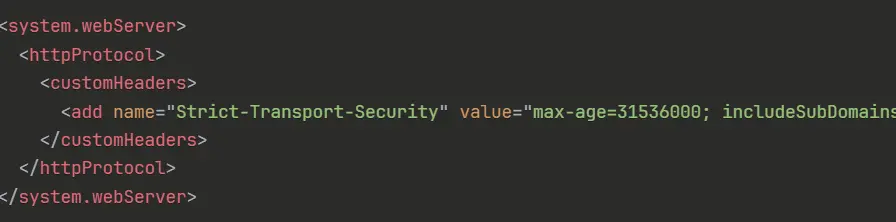
<system.webServer>
<httpProtocol>
<customHeaders>
<add name=”Strict-Transport-Security” value=”max-age=31536000; includeSubDomains; preload” />
</customHeaders>
</httpProtocol>
</system.webServer>
Cloudflare (optional alternative):
Enable HSTS in SSL/TLS settings with appropriate max-age configuration. Note that Cloudflare-level HSTS still requires verification through an HSTS check.
Implementation sequence:
- Verify all domains and subdomains support HTTPS
- Test configuration on staging environment
- Deploy with short max-age initially (e.g., 300 seconds)
- Perform HSTS check to confirm header delivery
- Monitor for 24-48 hours
- Increase max-age to full 31536000 seconds
Running an HSTS check immediately after configuration changes confirms your HSTS header reaches browsers correctly. Failed HSTS checks at this stage indicate server configuration errors requiring correction before proceeding to longer max-age values.
Testing and Validation Process
Run comprehensive HSTS check across:
- Primary domain (www and non-www versions)
- Critical subdomains (api, admin, mail, cdn)
- Multiple page types (homepage, inner pages, API endpoints)
Browser behavior testing:
- Clear browser cache completely
- Visit site using HTTP URL
- Verify automatic upgrade to HTTPS
- Check chrome://net-internals/#hsts for domain entry
- Confirm header appears in all responses
Ongoing monitoring:
Schedule quarterly HSTS check reviews to catch configuration drift after server updates, missing headers on new subdomains, and expiring max-age values approaching zero. Set up automated monitoring through security header testing APIs to receive alerts when strict transport security header configuration changes unexpectedly.
Consistent HSTS check schedules prevent configuration regression that occurs during server migrations, platform updates, or CDN changes. Sites that performed initial HSTS checks but abandoned ongoing verification frequently lose protection without realizing enforcement has lapsed.
Conclusion
Sites without proper HSTS configuration sacrifice both security integrity and search engine trust signals that directly affect crawl behavior and ranking stability.
Regular HSTS verification through comprehensive checks across all domains identifies configuration vulnerabilities before exploitation. Deploy Strict-Transport-Security headers with minimum one-year max-age values, enable includeSubDomains after thorough testing, and establish quarterly audit schedules. Contact Content Whale today for a comprehensive HSTS implementation, security header audits, and ongoing monitoring services.
FAQ
What is HSTS?
HTTP Strict Transport Security forces browsers to use only HTTPS connections with your website. The strict transport security header automatically converts HTTP requests to HTTPS, preventing protocol downgrade attacks and insecure connection attempts at the browser level.
How do I check if my site has HSTS enabled?
Use SecurityHeaders.com for instant verification, check Chrome DevTools Network tab Response Headers for “strict-transport-security,” or query chrome://net-internals/#hsts. A proper HSTS check confirms header presence with adequate max-age and directive values.
What does the strict transport security header do?
The header instructs browsers to enforce HTTPS-only connections automatically. This enforcement blocks SSL stripping attacks, prevents HTTP downgrade attempts, and eliminates insecure connection vulnerabilities before network requests occur, protecting users from man-in-the-middle interception.
Can I remove HSTS after enabling it?
Set max-age=0 to disable standard HSTS enforcement immediately. However, preload list removal requires formal hstspreload.org submission and takes months as browsers update hardcoded lists. Non-preloaded HSTS expires naturally after the max-age period ends.
What happens if HSTS check fails?
Failed HSTS checks indicate missing security headers, exposing visitors to SSL stripping and protocol downgrade attacks. Configure your server with Strict-Transport-Security header (max-age=31536000; includeSubDomains), then run follow-up verification to confirm proper implementation and protection.